Case study · 2024–2025

Day Food Catalogue

A mobile-first e‑commerce catalogue for Day Food's customers in the Maldives, where Viber Pay is the most convenient payment method. Checkout composes a quotation and opens Viber with the message auto‑populated, customers just tap send.

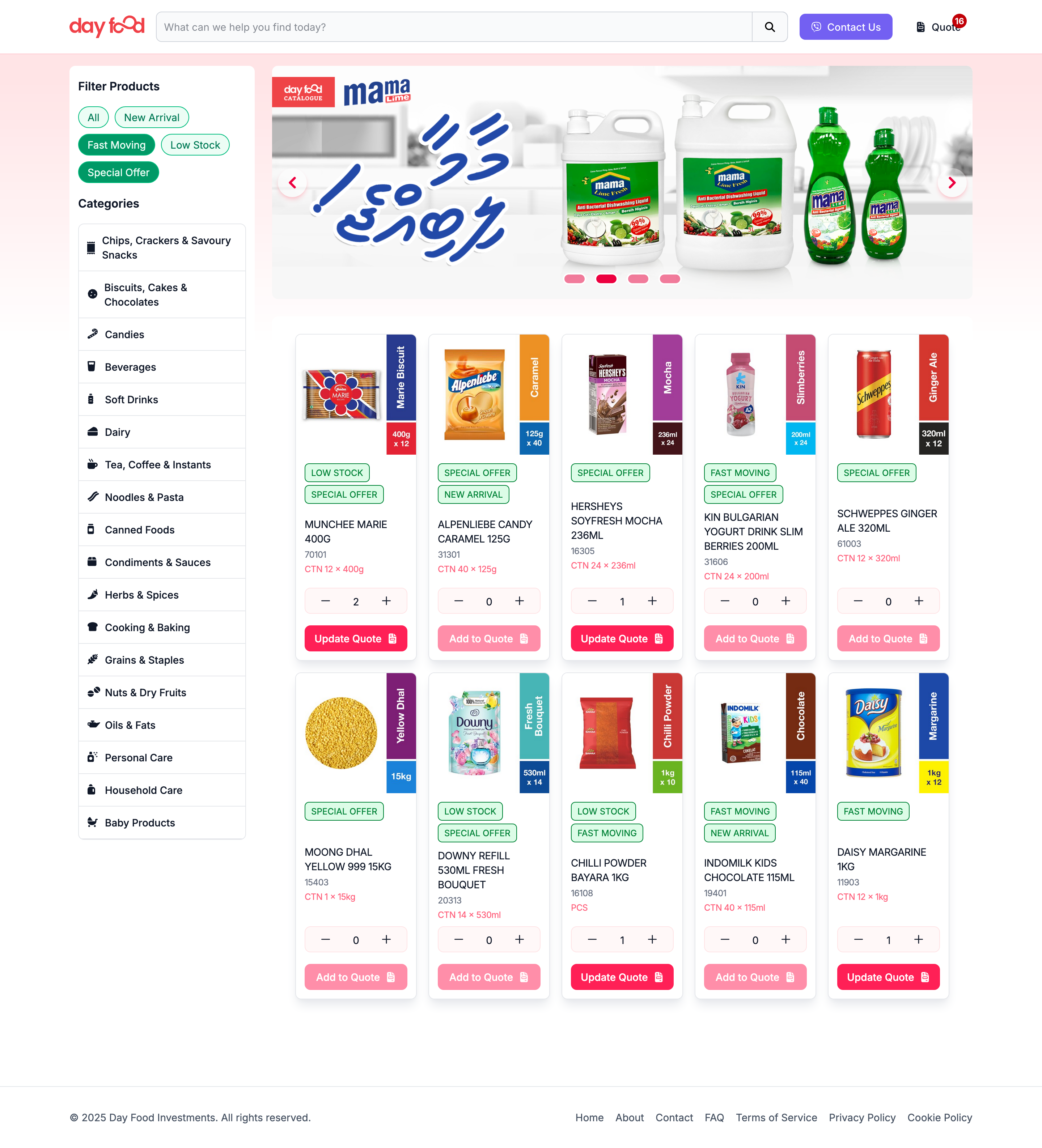
Day Food Catalogue web interface showing food items in a grid layout
Day Food · food items in a grid layout
Project owners

Day Food Investments, Kintsugi Design

Technology stack

Ruby on Rails + Hotwire (Turbo, Stimulus, Native), Solidus Commerce

Year

Project links
dayfood.mv — link no longer works

Summary

Day Food Catalogue is a mobile-first catalogue focusing on the needs of Day Food's customers in the Maldives where Viber Pay is the most convenient payment method.

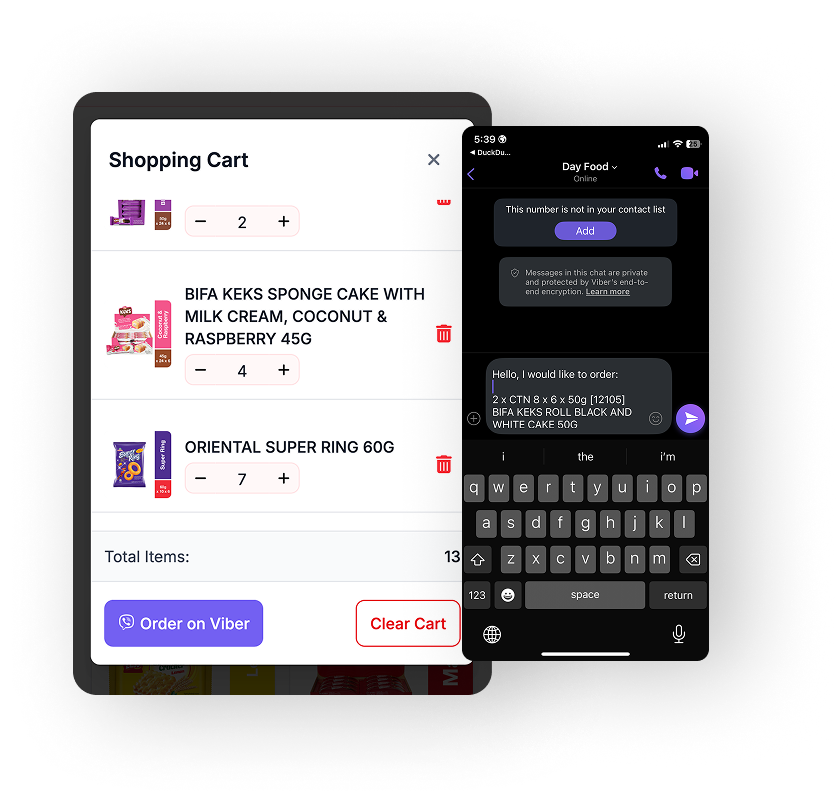
Checkout generates a quotation and opens Viber with the message auto-populated. Customers just tap send to order. Includes search, filter, and a quote (shopping cart).

Day Food Catalogue reduces friction at checkout!

Beyond standard e‑commerce capabilities, the checkout composes a quotation and opens Viber with the message prefilled so customers can confirm in one tap.

The current version allows customers to select product without variant or unit-of-measure, so there are still a bit of friction before order is placed. Variants & unit-of-measure and automatic order creation in Odoo are in development and will be added in the next phase.

There is also a basic PWA layer that supports regular customers who prefer an app-like experience.

Key Features

Read time: 12-15 min. This is an E‑commerce Catalogue with Viber Checkout, built during 2024–2025 with Project Owners Day Food Investments and Kintsugi Design. Project links: dayfood.mv — link no longer works.
Problem Statement & Goals

Ordering commonly happens through Viber chats with sales. The friction is turning customer's intent into a structured quote that sales can process quickly. Mobile-first is a must as Viber is the primary communication channel in the Maldives.

Goals
  • One‑tap checkout that composes a structured quotation into Viber
  • Fast product discovery: search, filter, brand‑led browsing
  • Cart as quote builder (not a payment cart)
  • Mobile‑first design while also responsive on larger screens
Non‑Goals (Phase 2)
  • Payments integration
  • Variants & unit‑of‑measure selection
  • Automatic Odoo order creation
            flowchart TD
                subgraph Customer["Customer Domain"]
                    C1["Small Vendors"]
                    C2["Hotel Purchasers"]
                    C3["Restaurant Managers"]
                end

                subgraph Sales["Sales Domain"]
                    S1["Sales Reps"]
                    S2["Viber Communication"]
                    S3["Quote Processing"]
                end

                subgraph Ops["Operations Domain"]
                    O1["Order Fulfillment"]
                    O2["Inventory Management"]
                    O3["Logistics"]
                end

                subgraph ERP["ERP Domain"]
                    E1["Odoo System"]
                    E2["Order Records"]
                    E3["Reporting"]
                end

                Customer -->|"Browse & Build Quote"| Sales
                Sales -->|"Confirm Order"| Ops
                Sales -->|"Create Record"| ERP
                Ops -->|"Update Status"| ERP
                ERP -->|"Sync Status"| Sales
                Ops -->|"Deliver Products"| Customer

                classDef domainClass fill:#f8f9fa,stroke:#0dcaf0,stroke-width:1px
                class Customer,Sales,Ops,ERP domainClass
            
Context Map showing relationships between Customer, Sales, Operations, and ERP domains

Background

Day Food Maldives serves customers across more than 200 islands with varying connectivity. Sales conversations commonly happen on Viber, a channel customers already trust. The product needed to work well on mobile, support quick discovery, and streamline the handoff from deciding to actually placing an order.

User Research

The Day Food team shared valuable insights from their customer interactions. Vendors, hotel purchasers, and restaurant managers all need to browse products efficiently and place orders through Viber. The design needed to accommodate both regular customers who know exactly what they want and new customers who need to explore the catalog.

Key User Types
  • Small vendors making weekly/bi‑weekly orders
  • Hotel purchasers with bulk orders
  • Restaurant managers with frequent orders
Internal Users
  • Sales reps confirming orders via Viber
  • Ops staff fulfilling and reconciling orders
            mindmap
              root((User Types))
                ::icon(fa fa-users)
                Primary Users
                  ::icon(fa fa-store)
                  Small Vendors
                    ::icon(fa fa-calendar-week)
                    Weekly Orders
                    Bi-Weekly Orders
                  Hotel Purchasers
                    ::icon(fa fa-hotel)
                    Bulk Orders
                    Specific Requirements
                  Restaurant Managers
                    ::icon(fa fa-utensils)
                    Frequent Orders
                    Specialty Items
                Internal Users
                  ::icon(fa fa-building)
                  Sales Reps
                    ::icon(fa fa-comments)
                    Viber Communication
                    Order Confirmation
                  Operations Staff
                    ::icon(fa fa-clipboard-check)
                    Order Fulfillment
                    Order Reconciliation
            
User types and their key characteristics
            journey
              title User Journey
              section Discover
                Search by Brand: 5: Customer
                Browse Categories: 4: Customer
                Filter Products: 4: Customer
              section Build Quote
                Add Products: 5: Customer
                Adjust Quantities: 4: Customer
                Review Quote: 3: Customer
              section Confirm
                Send via Viber: 5: Customer, Sales
                Discuss Details: 4: Customer, Sales
                Finalize Order: 3: Sales, Ops
            
Customer journey with satisfaction ratings at each step
            graph LR
                subgraph "Key Research Insights"
                    I1["Viber is trusted"] --> S1["Keep human-in-the-loop"];
                    I2["Brand-focused search"] --> S2["Optimize brand filtering"];
                    I3["Remote connectivity issues"] --> S3["Offline-friendly browsing"];
                end

                subgraph "Design Implications"
                    S1 --> D1["Viber checkout flow"];
                    S2 --> D2["Brand-first navigation"];
                    S3 --> D3["PWA with caching"];
                end

                classDef insights fill:#e3f2fd,stroke:#0d6efd,stroke-width:1px;
                classDef solutions fill:#d1e7dd,stroke:#198754,stroke-width:1px;
                classDef designs fill:#fff3cd,stroke:#ffc107,stroke-width:1px;

                class I1,I2,I3 insights;
                class S1,S2,S3 solutions;
                class D1,D2,D3 designs;
            
Research insights and their impact on design decisions

Proposed Solution

Checkout to Viber

The checkout composes a structured quotation and opens Viber with the message prefilled to Day Food's hotline. Customers review and tap send, minimizing onboarding and matching existing sales workflows.

Structured message composed at checkout for one‑tap send

Systems Design

Information Design

UX Patterns

Architecture Diagram

flowchart LR
  User["Customer (Mobile)"] --> UI["Rails + Hotwire UI"]
  UI --> Spree["Spree Commerce Domain"]
  Spree --> DB[("PostgreSQL")]
  UI -.-> Viber["Viber Deep Link\n(prefilled quote)"]
  Viber --> Sales["Sales (Human-in-the-loop)"]
  Sales -->|confirm| Odoo[("Odoo ERP")]
  Odoo -->|sync status| UI

  UI --> SW["Service Worker\n(cache-first)"]
  SW --> CDN["Static Assets"]
          
High-level system interactions across UI, commerce, Viber, and ERP

Information Architecture Map

flowchart TD
  Catalog["Catalog"] --> Category["Category"]
  Category --> Brand["Brand"]
  Brand --> Product["Product"]
  Product --> Line["Quote Line"]
  Line --> Qty["Quantity"]
  Line --> UOM["Unit of Measure (future)"]
  Line --> Variant["Variant (future)"]

  Quote["Quote Message"] --> Header["Header"]
  Quote --> Totals["Totals"]
  Quote --> Contact["Contact"]
          
Catalog to quote structure: from taxonomy to message schema

Experience Flows

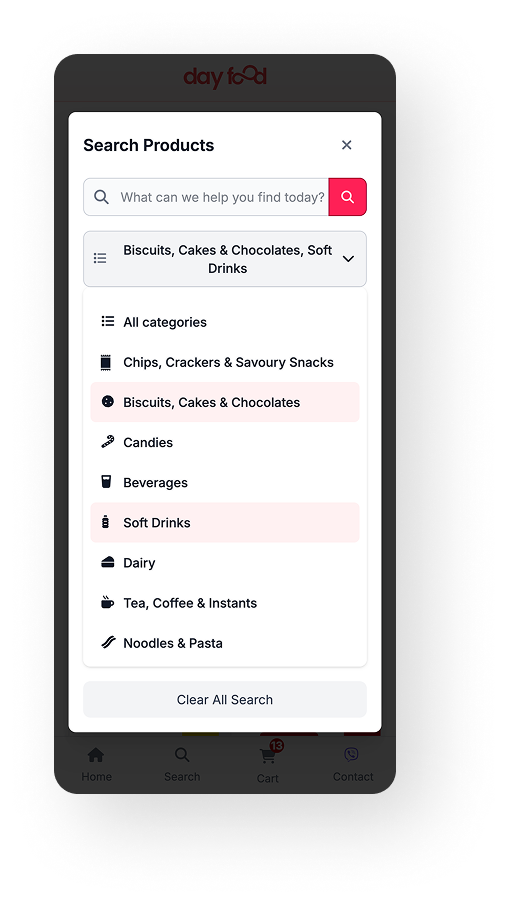
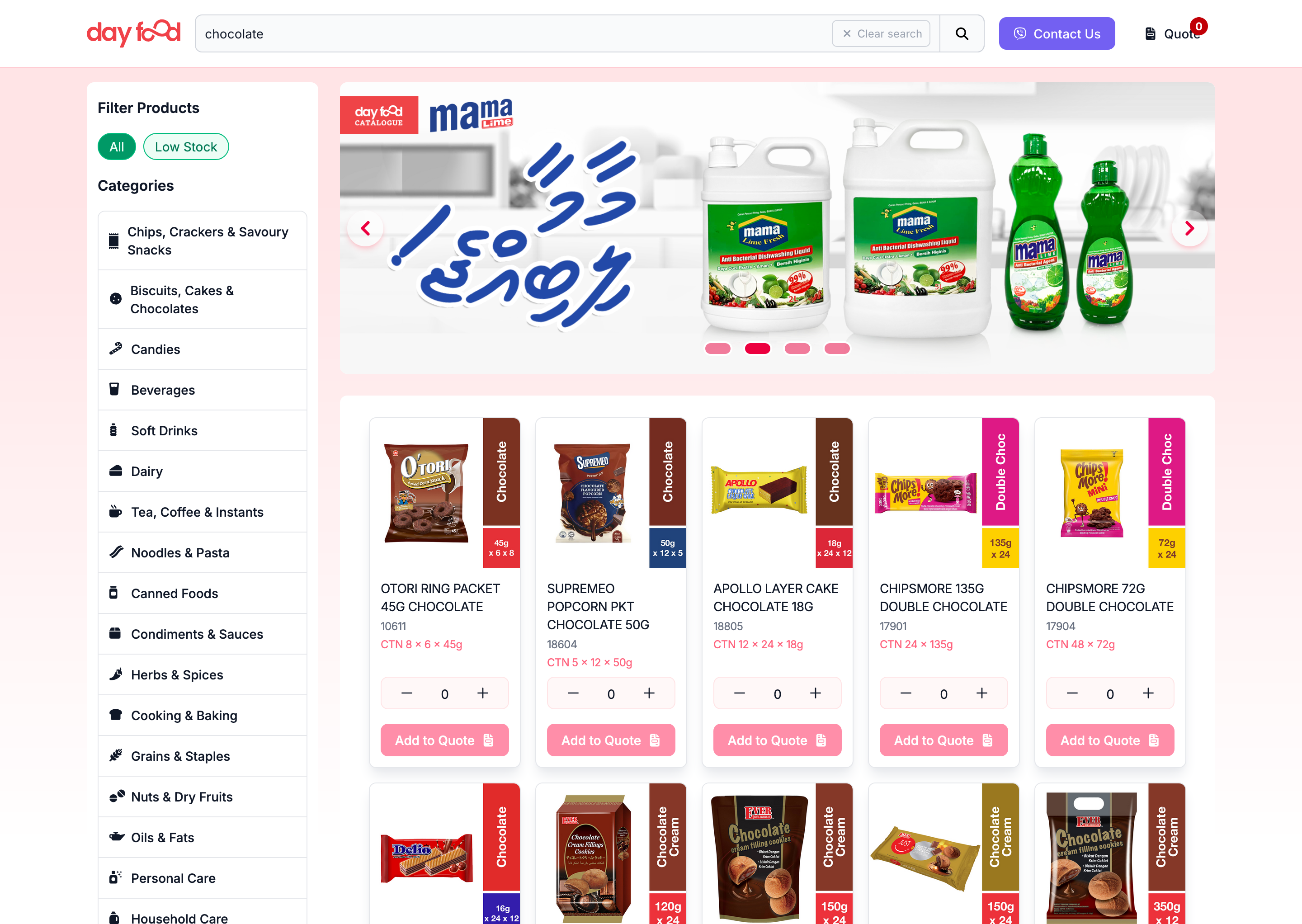
Search & Filter
  • Typeahead by product and brand
  • Category filters reduce scanning
Build Quote
  • Adjust quantities in-line on card or detail
  • Cart summarizes lines for review
Checkout to Viber
  • Compose message → open Viber → one-tap send
  • Fallbacks: copy-to-clipboard/email if Viber unavailable
Add to Quote (Desktop)

Delivery & Project Management

            gantt
              title Day Food Catalogue Project Timeline
              dateFormat  YYYY-MM-DD
              axisFormat %b %Y
              todayMarker stroke-width:5px,stroke:#0dcaf0,opacity:0.5

              section Phase 1: MVP
              Discovery & Research       :done, disc, 2025-01-15, 30d
              Design & Prototyping       :done, design, after disc, 45d
              MVP Development            :done, dev1, after design, 60d
              Quote-to-Viber Launch      :done, milestone, after dev1, 0d

              section Phase 2
              Variants & UOM             :active, var, 2025-07-01, 45d
              Odoo Integration           :odoo, after var, 60d
              PWA Enhancements           :pwa, 2025-07-15, 90d

              section Phase 3
              Hotwire Native Planning    :plan, 2025-10-01, 30d
              Native App Development     :native, after plan, 90d

              section Risk Mitigation
              Offline-first UI           :crit, risk1, 2025-03-01, 120d
              Viber Fallbacks            :crit, risk2, 2025-04-15, 45d
              Staged ERP Integration     :crit, risk3, 2025-08-01, 90d
            
Project timeline showing phases, key milestones, and risk mitigation activities
            flowchart TD
                subgraph PM["Project Management"]
                    Weekly["Weekly Stakeholder Reviews"]
                    Feedback["Sales Feedback Loop"]
                    Agile["Agile Development Cycles"]
                end

                subgraph Risks["Key Risks"]
                    R1["Connectivity Issues"]
                    R2["Viber Dependency"]
                    R3["ERP Integration Timing"]
                end

                subgraph Mitigations["Risk Mitigations"]
                    M1["Offline-first UI Design"]
                    M2["Alternative Checkout Fallbacks"]
                    M3["Staged Integration Approach"]
                end

                R1 --> M1
                R2 --> M2
                R3 --> M3

                PM --> Risks
                PM --> Mitigations

                classDef riskClass fill:#f8d7da,stroke:#dc3545,stroke-width:1px
                classDef mitigationClass fill:#d1e7dd,stroke:#198754,stroke-width:1px
                classDef pmClass fill:#e3f2fd,stroke:#0d6efd,stroke-width:1px

                class R1,R2,R3 riskClass
                class M1,M2,M3 mitigationClass
                class Weekly,Feedback,Agile pmClass
            
Project management approach with risk identification and mitigation strategies

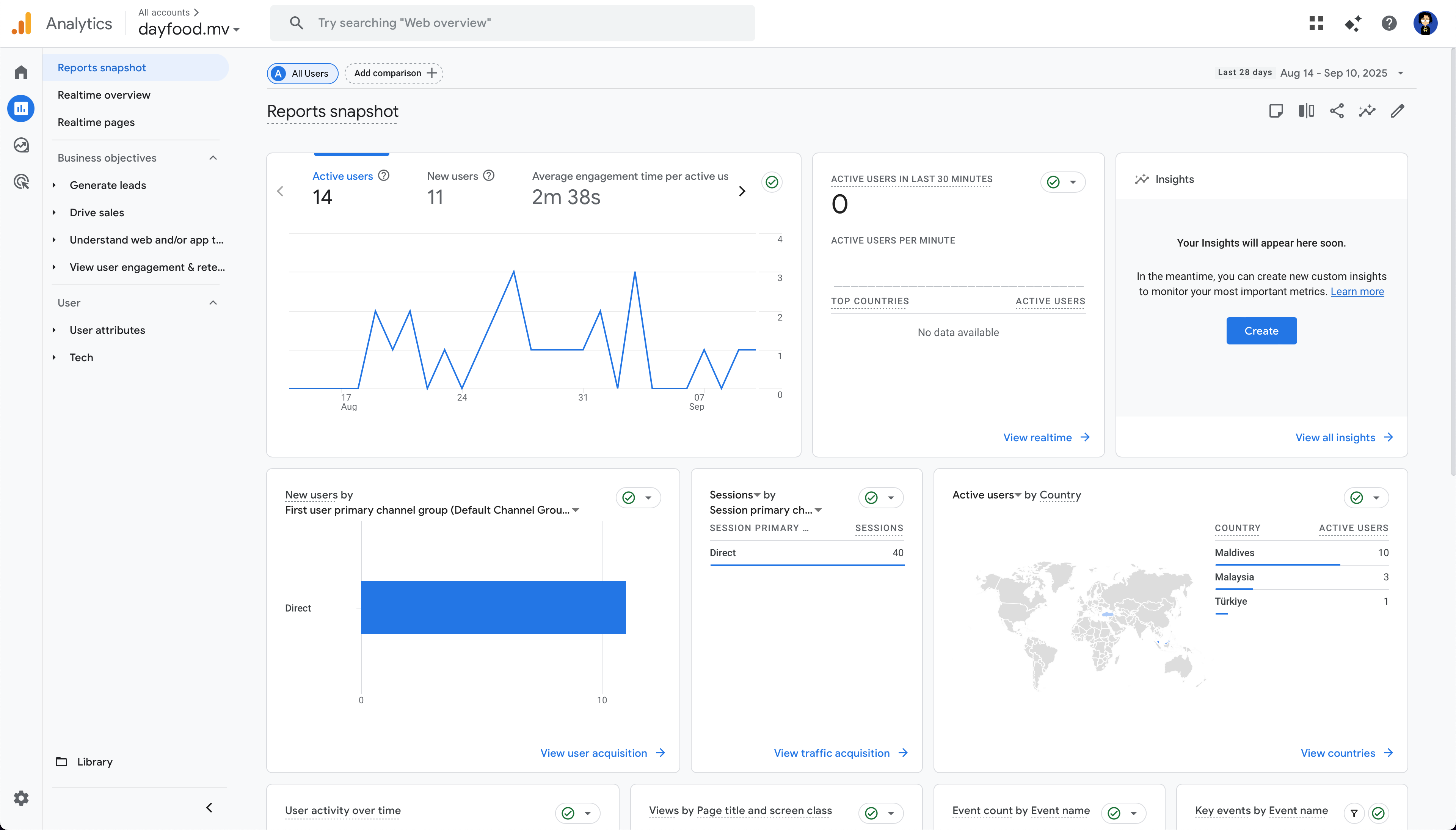
Outcomes & Validation

Google Analytics Snapshot

Showcase

Search and Filter Experience

Product Management & Checkout

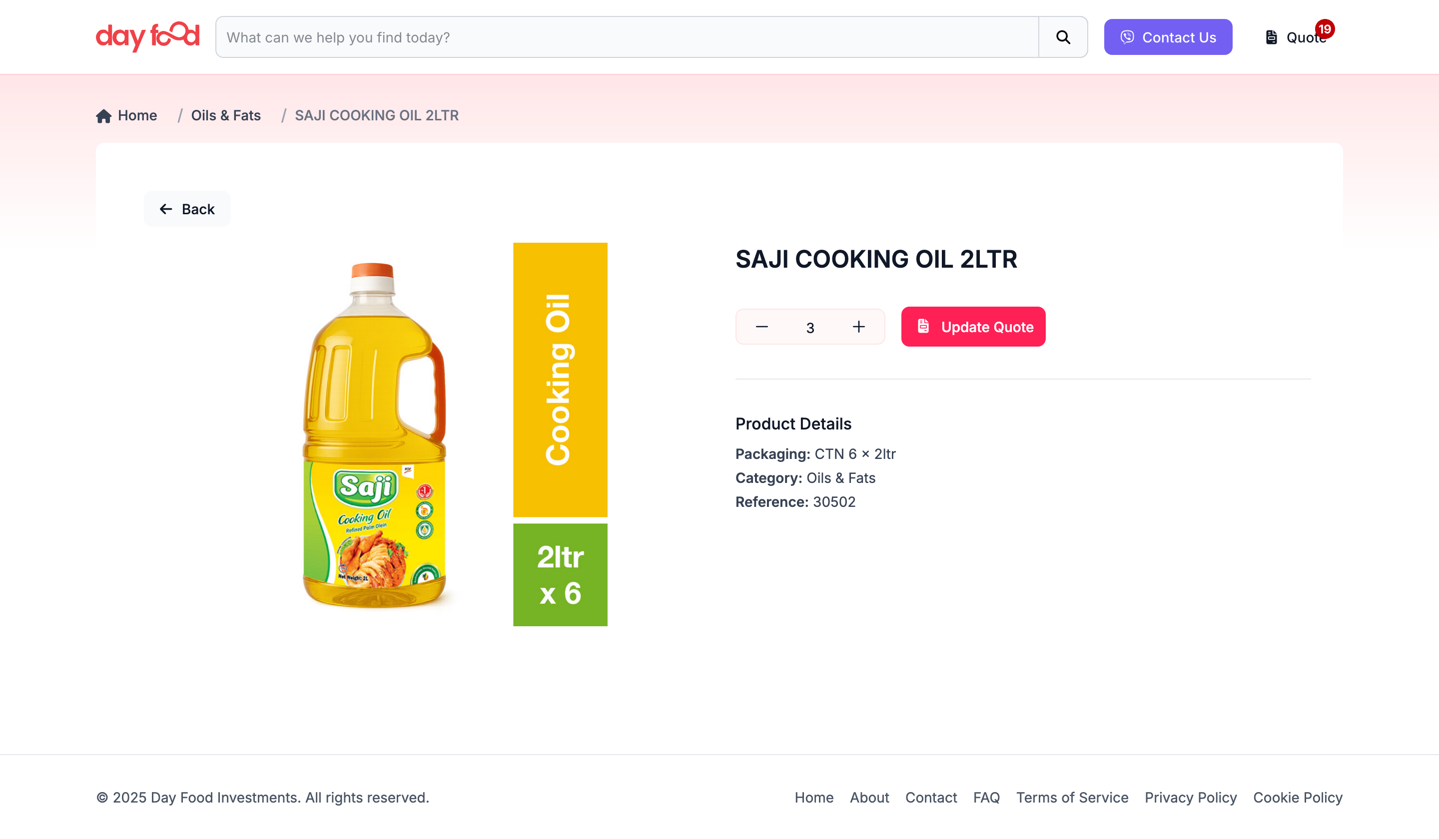
Product Details
Product details with large image and add to quote button

Quote (Cart) Management

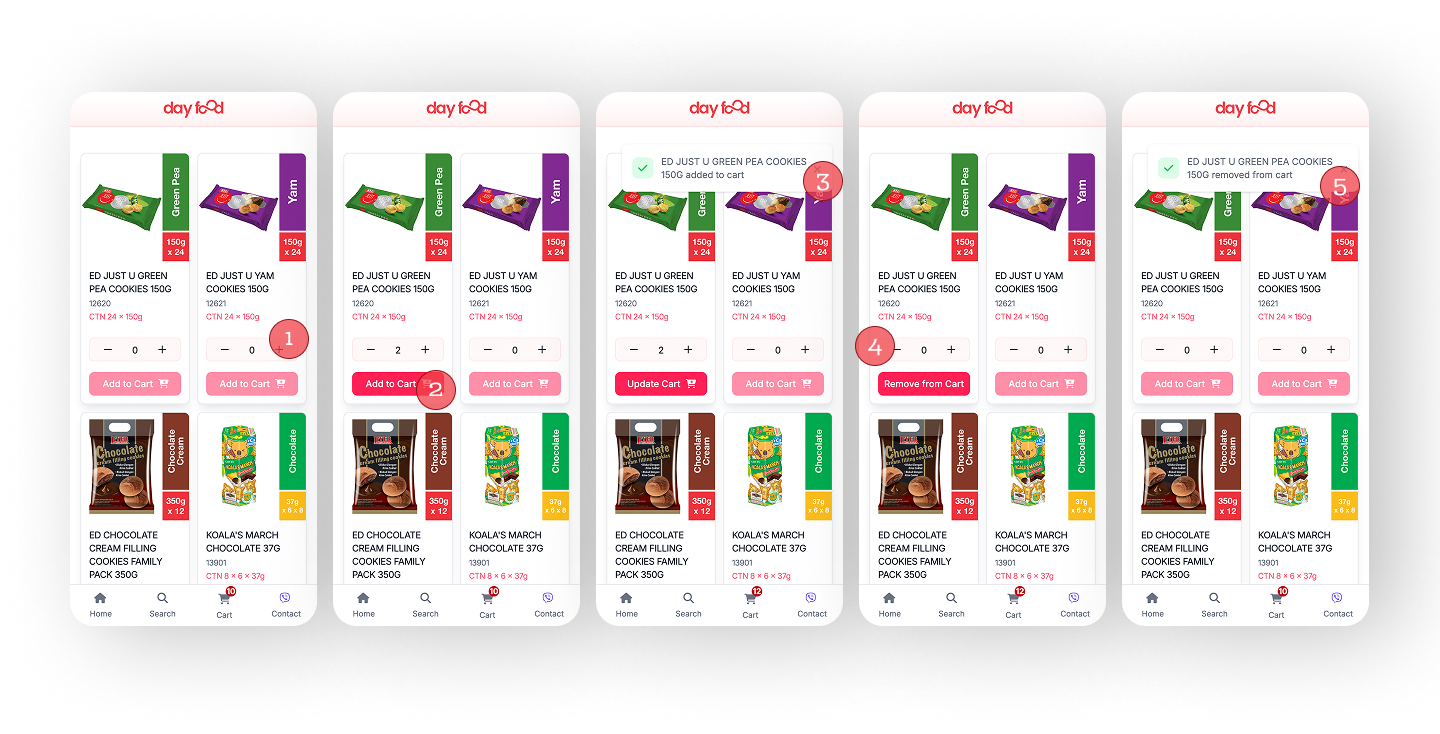
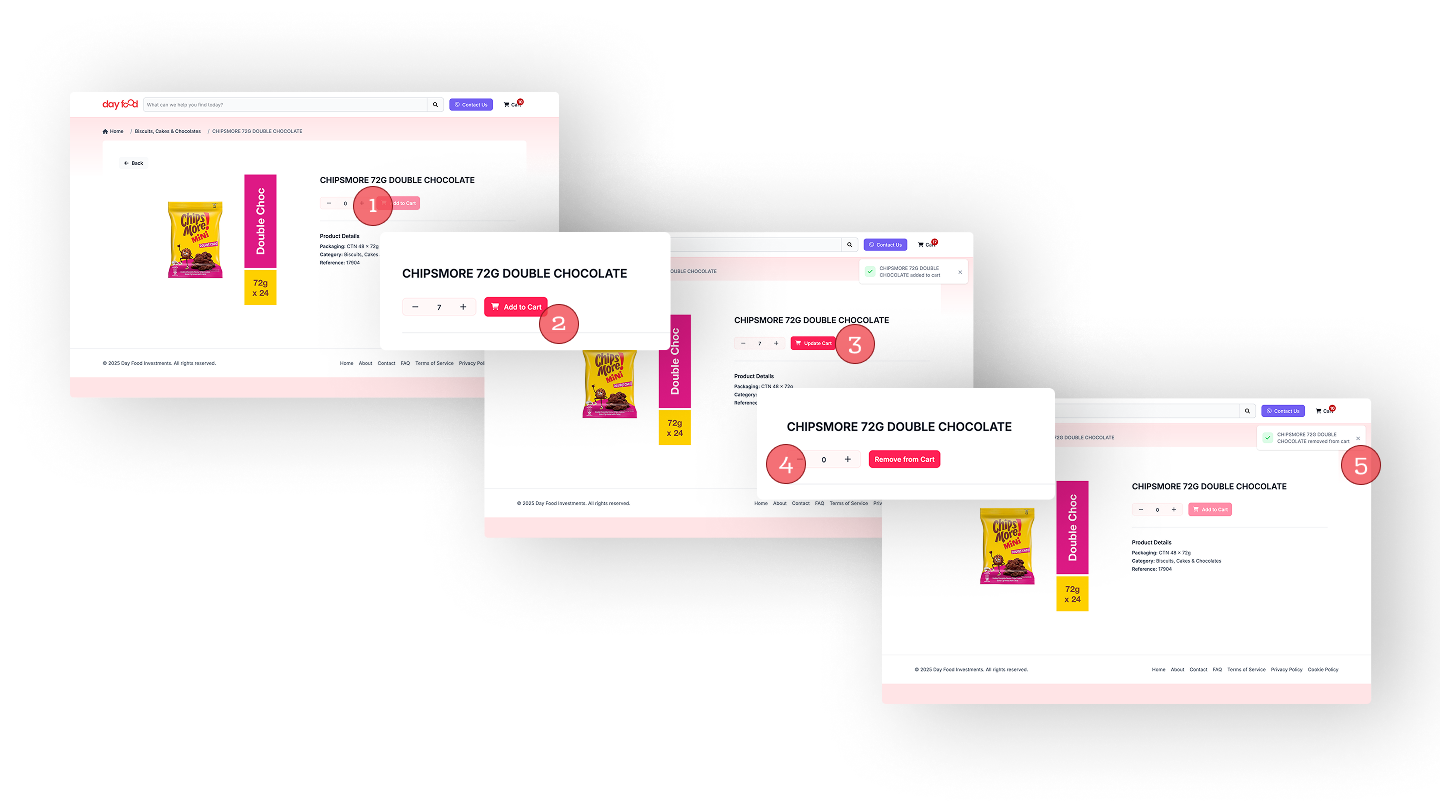
Dynamic product buttons clearly state the actions that customers are about to perform. The intuitive interface allows users to add, remove, and adjust quantities with minimal effort.

Add to Quote (Desktop)
Add to Quote Flow:
1
Click + to add quantity of product.
2
Click Add to Quote to add product to cart.
3
Click Checkout to Viber to complete order.
Add to Quote (Mobile)

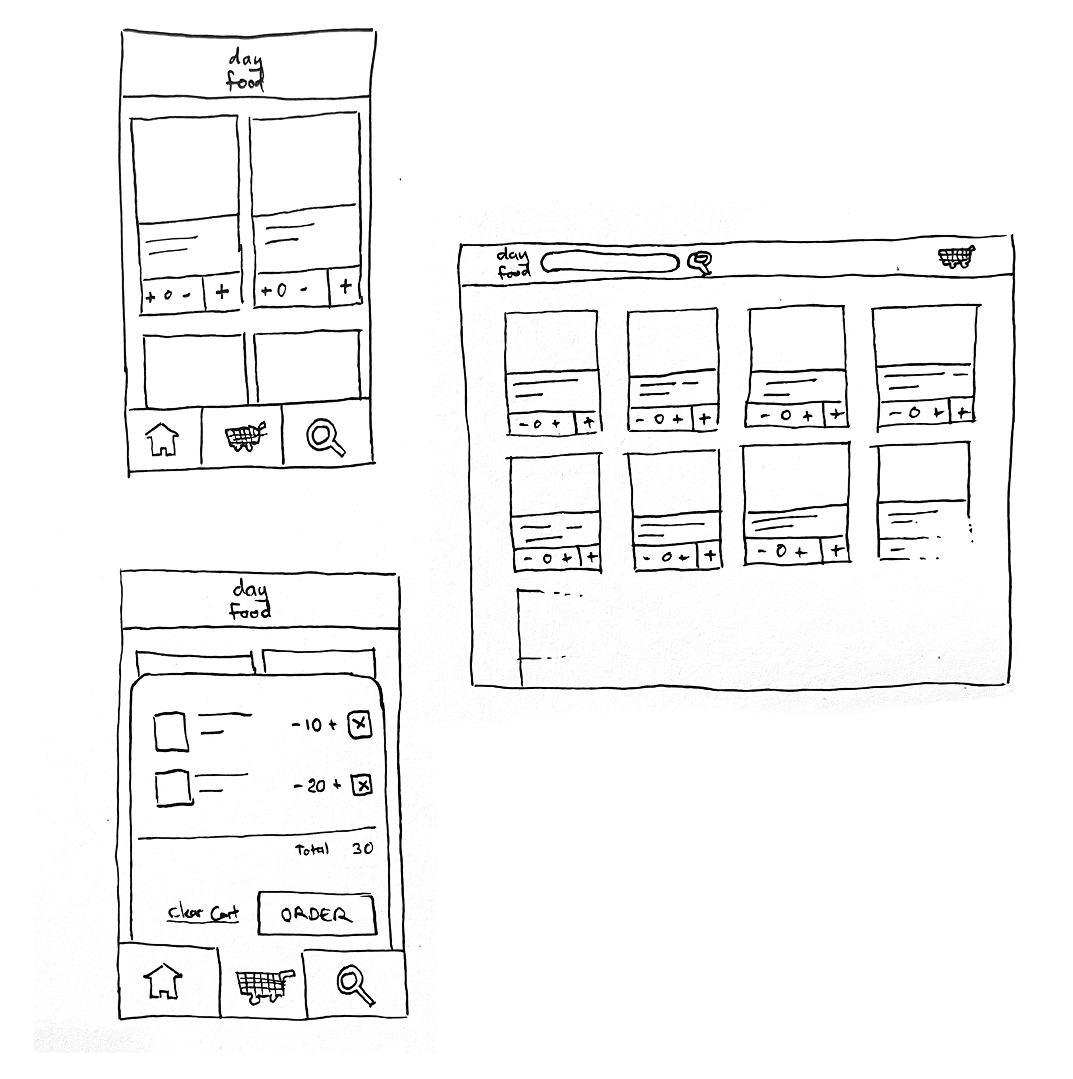
Sketches and Low-Fi Mockups

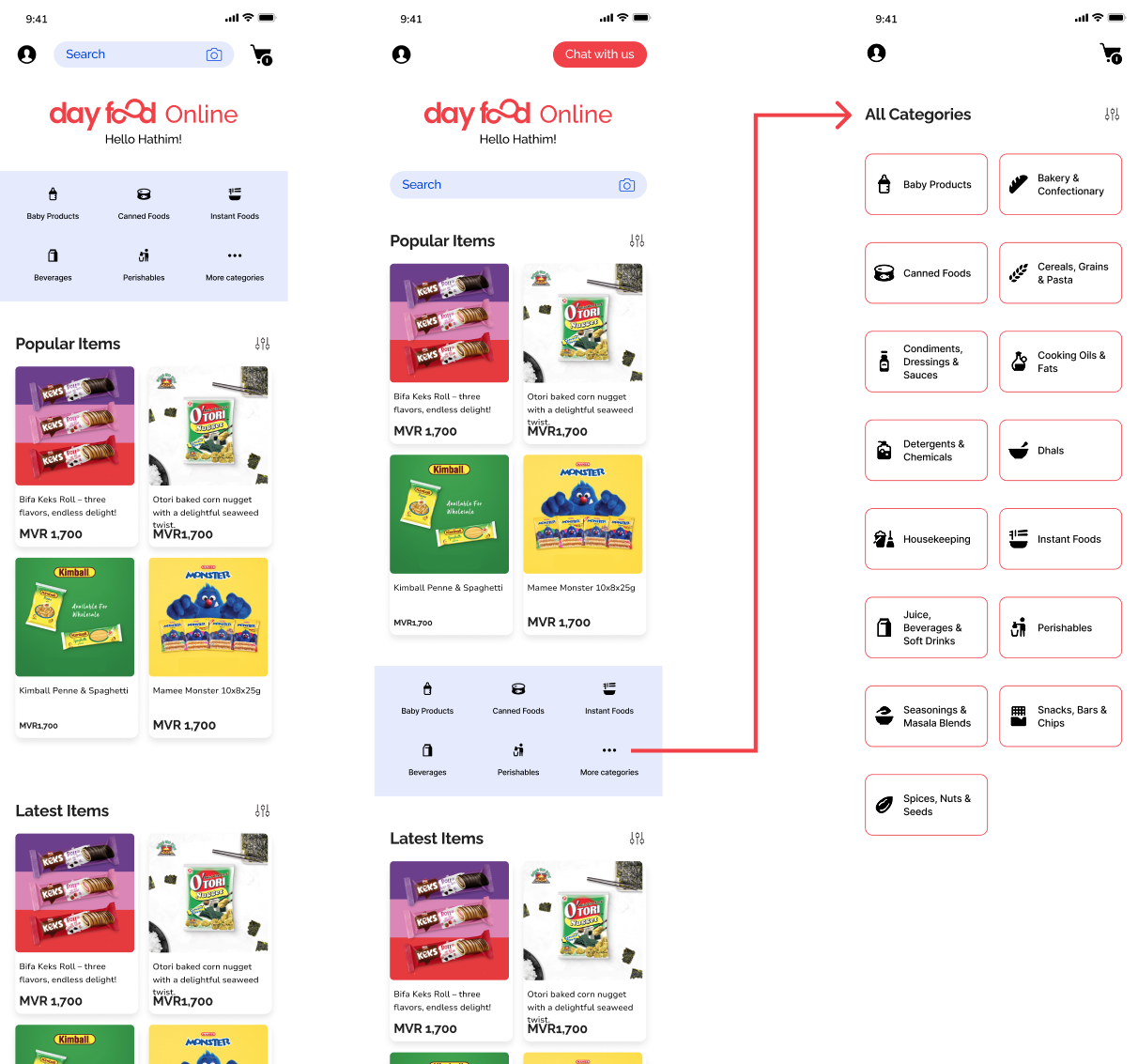
Low-Fi Mockup (Mobile)
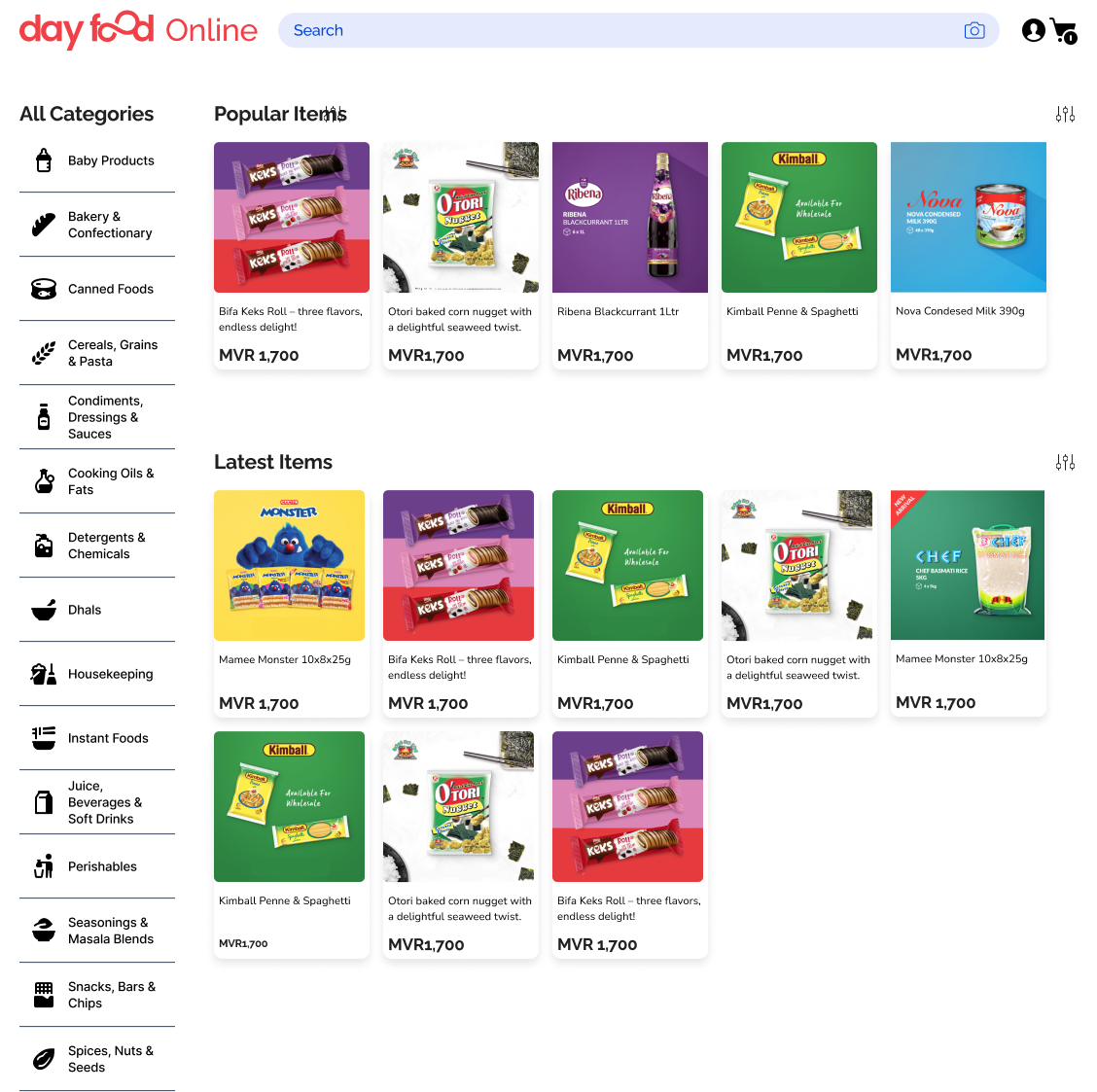
Low-Fi Mockup (Desktop)

Moving Forward

Phase 2: Core Enhancements

Variants & UOM
  • Select variant options in product and cart
  • Unit-of-measure selection impacts quantities
  • Accurate totals in the composed quote
Odoo Automation
  • Create Odoo order upon Viber confirmation
  • Sync order status back to sales
  • Retry and reconciliation for failures
PWA & Reorders
  • Full offline product browsing
  • Save and reuse previous orders
  • Improved app-like experience
Native App Planning
  • Evaluate Hotwire Native approach
  • Push notifications for order updates
  • Offline-first architecture

Appendix: Technical Notes

PWA & Offline
  • Service Worker with cache-first strategy for static assets
  • Graceful degradation for flaky connectivity
  • Install prompt for regular buyers
Performance & Images
  • Responsive image variants and lazy loading
  • Minimal blocking JS via Hotwire (Turbo/Stimulus)
  • DB indexes for product and taxonomy lookups
Security
  • CSRF protection and secure headers
  • Content Security Policy (CSP)
  • Input validation for deep-link payloads
Viber Deep Link
  • Encoded cart lines: product, qty, unit, brand
  • Fallback to copy-to-clipboard/email if Viber unavailable
  • Message schema aligns with sales processing
Tech Stack
  • Ruby on Rails 7 with Hotwire
  • PostgreSQL for persistence
  • Spree Commerce for catalog management
Deployment
  • Containerized with Docker
  • CI/CD pipeline with GitHub Actions
  • Hosted on Digital Ocean with CDN
sequenceDiagram
  autonumber
  participant C as Customer (Mobile)
  participant UI as Rails + Hotwire UI
  participant SP as Spree Commerce
  participant DB as PostgreSQL
  participant VB as Viber
  participant S as Sales
  participant OD as Odoo ERP

  C->>UI: Browse catalog
  UI->>SP: Get products
  SP->>DB: Query products
  DB-->>SP: Return products
  SP-->>UI: Products data
  UI-->>C: Display products

  C->>UI: Add to quote
  UI->>UI: Update cart
  C->>UI: Checkout to Viber
  UI->>VB: Open Viber with quote
  VB->>S: Send quote message
  VB->>S: Message delivered
  S-->>C: Confirm details
  S->>OD: Create order (planned)
  OD-->>UI: Status sync (planned)
  UI-->>C: Status update
          
High-level sequence across user, app, Viber, and ERP

Conclusion

The Day Food Catalogue demonstrates how modern web tools can make a fast, accessible, and user-friendly product showcase. The combination of Ruby on Rails, Hotwire, and PostgreSQL provides a solid foundation that balances developer productivity with application performance.